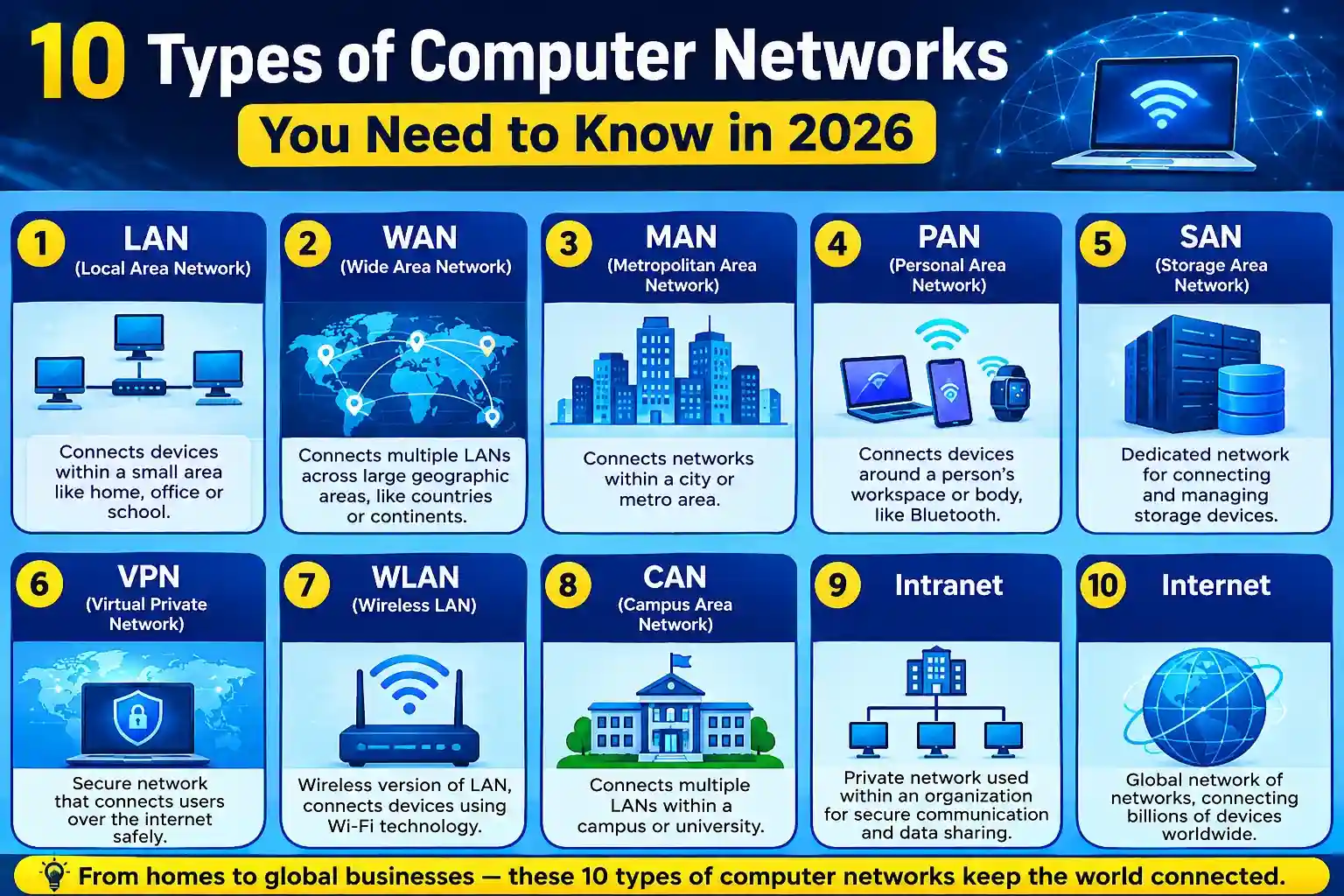
Every time you send a message, stream a video, join a video call, access a cloud application, or browse a website, a computer network is working behind the scenes. Networks allow computers, smartphones, servers, printers, IoT devices, and other systems to communicate and share information.
But not every network is built for the same purpose. Some are designed for communication between devices in a small room, while others connect offices across cities or computers across the world.
Understanding the types of network is therefore useful for students, business owners, IT professionals, and anyone who wants to understand how modern technology works.
In this guide, we’ll explore 10 types of computer network, how they work, where they’re used, and what makes each one different.
What is a computer network?
A computer network is a collection of computers and devices that are linked to each other and are able to share resources and communicate with each other to exchange data.
They can be linked via Ethernet cable, fiber optics, wireless through Wi-Fi, cell phone, or other means.
When a number of computers are connected together within the same office to share files and a printer, they are part of a network. If millions of devices are communicating over the internet, then they’re a part of a much larger network.
Geographical range, number of connected devices, performance needs, security, and purpose are all factors that determine the appropriate network.
Why Are There Different Types of Networks?
A single networking solution cannot meet every requirement.
A home user may only need a small network to connect a laptop, smartphone, smart TV, and printer. A multinational company, on the other hand, may need networks connecting offices across multiple countries.
That’s why different network types have been developed.
They can be classified based on:
- Geographical coverage
- Number of connected devices
- Communication method
- Network architecture
- Purpose and application
- Distance between connected devices
Now let’s look at the most common types of networks you should know in 2026.
1. Personal Area Network (PAN)
A Personal Area Network, or PAN, is one of the smallest types of computer network. It connects devices within a very short range, usually around an individual.
A common example is connecting a smartphone to wireless earbuds using Bluetooth. A laptop, smartwatch, wireless keyboard, and smartphone can also communicate through a personal network.
Common Uses of PAN
- Connecting smartphones and smartwatches
- Wireless keyboards and mice
- Bluetooth headphones
- Sharing data between personal devices
- Connecting personal IoT devices
Advantages of PAN
PANs are easy to set up, inexpensive, and convenient for connecting personal devices. They generally consume relatively little power when technologies such as Bluetooth are used.
2. Local Area Network (LAN)
One of the most popular types of network is a Local Area Network or LAN.
A LAN is a network of computers and devices linked together within a small area like a home, school, office, lab or small building.
For instance, a LAN in an office may be configured so that the employees can share files, printers, servers and Internet access.
LANs can be wired Ethernet or wireless Wi-Fi or a mix of both.
Common Uses of LAN
Home networks
Office networks
School computer labs
Small businesses
The sharing of files and printers.
Advantages of LAN
LANs usually offer high-speed communication between the connected devices, and resource sharing becomes more convenient. Organizations can also set up security measures and access restrictions to control access to network resources.
3. Wireless Local Area Network (WLAN)
A wireless local area network (WLAN) is a local network that operates without cables.
Wi-Fi is the most familiar technology of which people usually think of when they hear WLAN.
When you join in with WiFi at home, you are most frequently joining in with a WLAN.
Common Uses of WLAN
Homes and apartments
Offices
Cafes and restaurants
Schools and universities
Airports, public areas
Advantages of WLAN
Mobility is the greatest advantage of WLAN. Within the coverage area, users can move around without having to connect to a physical network cable.
But, wireless networks require configuration and security to ensure that no one can access without authorization.
4. Metropolitan Area Network (MAN)
A Metropolitan Area Network, or MAN, covers a larger area than a LAN but is generally smaller than a WAN.
A MAN can connect multiple buildings, offices, campuses, or facilities across a city or metropolitan region.
For example, an organization with several offices located throughout a city may use networking infrastructure that functions as a metropolitan-area network.
Common Uses of MAN
- Connecting branches within a city
- University campuses
- Government networks
- Municipal infrastructure
- Large organizations with multiple local facilities
Advantages of MAN
MANs can provide high-speed communication between multiple locations within a metropolitan area while covering significantly more ground than a traditional LAN.
5. Wide Area Network (WAN)
A Wide Area Network, or WAN, covers a large geographical area. It can connect networks across cities, countries, or continents.
The internet is the most famous example of a global network infrastructure, while businesses may use private WAN technologies to connect offices in different locations.
A company headquartered in Delhi, for example, could connect its offices in Mumbai, Bengaluru, London, and New York through a WAN.
Common Uses of WAN
- Connecting international offices
- Enterprise communication
- Cloud connectivity
- Banking infrastructure
- Telecommunications
- Large-scale business networks
Advantages of WAN
WANs allow organizations to communicate and share resources across long distances. They are essential for businesses that operate across multiple geographical locations.
The downside is that WANs can be more expensive and complex to manage than smaller networks.
6. Storage Area Network (SAN)
A Storage Area Network, or SAN, is a specialized high-speed network designed primarily to provide access to centralized storage.
Instead of treating storage as simply another resource attached to an individual computer, a SAN allows servers to access dedicated storage infrastructure.
SANs are commonly found in data centers and enterprise environments where performance, availability, and centralized storage management are important.
Common Uses of SAN
- Enterprise data centers
- Database systems
- Virtualization environments
- Large-scale storage
- Backup and disaster recovery
Advantages of SAN
SANs can provide fast and centralized access to storage while making it easier for organizations to manage large volumes of business data.
7. Campus Area Network (CAN)
A Campus Area Network, or CAN, connects multiple LANs within a relatively limited campus or organizational area.
Universities are a common example. A university may have separate networks for different departments, buildings, libraries, laboratories, and administrative offices while connecting them through a larger campus network.
Common Uses of CAN
- Universities
- Corporate campuses
- Research facilities
- Large schools
- Industrial campuses
Advantages of CAN
CANs provide centralized connectivity across multiple buildings while remaining more geographically limited than a typical WAN.
They are useful when an organization needs different local networks to communicate efficiently.
8. Virtual Private Network (VPN)
A Virtual Private Network, commonly called a VPN, creates an encrypted connection over an existing network infrastructure.
Unlike LAN, MAN, and WAN, VPN describes a method of creating a secure virtual connection rather than simply defining a geographical network size.
For example, a remote employee can use a VPN to securely access certain company resources while working outside the office.
Common Uses of VPNs
- Secure remote access
- Connecting employees to company resources
- Protecting data over untrusted networks
- Connecting geographically separated networks
- Supporting remote work
Advantages of VPNs
A VPN can improve privacy and security by encrypting network traffic between supported endpoints. However, VPN security depends heavily on how the service is configured and managed.
9. Personal or Home Network
Home networks are another everyday example of types of networks.
A typical home network may connect smartphones, laptops, smart TVs, gaming consoles, printers, cameras, speakers, and smart-home devices through a router.
Although a home network is usually a form of LAN or WLAN, it is useful to understand it as a practical networking environment because connected devices are becoming increasingly common.
Common Uses
- Internet access
- Smart-home devices
- Gaming
- Streaming
- Wireless printing
- File sharing
Advantages
Home networks allow multiple devices to share an internet connection and communicate with each other conveniently.
As smart-home technology continues to grow, properly securing home networks has become increasingly important.
10. Enterprise Network
An enterprise network is designed to support the communication and business requirements of an organization.
It can combine several network types, including LANs, WLANs, WANs, VPNs, and data-center networks.
A modern enterprise network may connect employees, branch offices, cloud services, applications, servers, security systems, and IoT devices.
Common Uses of Enterprise Networks
- Large businesses
- Banks and financial institutions
- Healthcare organizations
- Universities
- Government organizations
- Global corporations
Advantages of Enterprise Networks
Enterprise networks are designed with scalability, security, reliability, performance, and centralized management in mind.
They are more complex than typical home or small-office networks but can support thousands or even millions of connected devices and users.
Types of Computer Networks Compared
Understanding the differences between the major types of computer network becomes easier when you compare their typical purpose and coverage.
| Network Type | Typical Coverage | Common Use |
| PAN | Very small/personal | Personal devices |
| LAN | Building or small area | Homes and offices |
| WLAN | Local wireless area | Wi-Fi networks |
| MAN | City/metropolitan area | Multiple locations |
| WAN | Large geographical area | Global businesses |
| SAN | Data-center environment | Storage |
| CAN | Campus | Universities and organizations |
| VPN | Virtual/remote | Secure connectivity |
| Home Network | Home | Connected personal devices |
| Enterprise Network | Organization-wide | Business operations |
How to Choose the Right Type of Network
Choosing a type of network depends on what you are trying to accomplish.
For a home with several connected devices, a LAN or WLAN is usually sufficient. A school or university may require a combination of LANs connected through a CAN.
A company with offices in multiple cities or countries may need a WAN combined with VPN technologies, cloud networking, and other enterprise networking solutions.
Consider these factors before choosing a network:
- Coverage: How far apart are the devices?
- Number of users: How many people and devices will connect?
- Performance: What speed and latency are required?
- Security: What information needs protection?
- Scalability: Will the network need to grow?
- Budget: How much can you invest in equipment and management?
- Reliability: How important is continuous availability?
What Are the Most Common Network Types?
Among the many types of networks, LAN, WLAN, WAN, MAN, PAN, and VPN are some of the terms people encounter most often.
However, these categories are not always mutually exclusive.
For example, a business may have a LAN inside each office, WLAN access for employees, a WAN connecting its offices, and VPN connections for remote workers.
In other words, modern networking often involves multiple network technologies working together rather than relying on one single type of network.
Network Types in 2026
Networking continues to evolve as cloud computing, artificial intelligence, remote work, edge computing, IoT, and connected devices become more widespread.
Modern networks increasingly need to handle:
- Large numbers of connected devices
- Cloud-based applications
- Real-time communication
- Remote and hybrid workers
- IoT and smart devices
- Increasing cybersecurity requirements
- High-bandwidth applications
- Distributed computing environments
This means understanding the fundamentals of network types remains important even as networking technologies change.
Final Thoughts
There are various kinds of computer networks, and each networks is meant for a various purpose. PAN can be used for personal devices; LAN and WLAN can be used in homes and offices, MAN connects locations within a metro area and WAN can be used for communication over a long geographical distance.
Enterprise storage can be achieved through specialized networks like SANs, and multiple campus networks can be linked with CANs. VPNs offer a virtual way to secure connectivity, and enterprise networks are made up of several technologies to meet complex enterprise needs.
The crucial point to keep in mind is that there is no one-size-fits-all network type for all scenarios. The proper solution is dependent on the size of the environment, connectivity requirements, security requirements, budget and future growth.
With networking constantly changing in 2026, it is important to understand these types of network before diving into more complex networking concepts and technologies.
Frequently Asked Questions
The main types of computer network include PAN, LAN, WLAN, MAN, WAN, CAN, SAN, VPN, home networks, and enterprise networks. Each type is designed for a different purpose, coverage area, or connectivity requirement.
LAN is one of the most common types of networks. It is widely used in homes, schools, offices, and small businesses to connect computers and other devices.
LAN connects devices within a relatively small geographical area, such as a home or office. WAN connects networks over much larger distances, such as between cities, countries, or continents.
Five commonly discussed network types are PAN, LAN, MAN, WAN, and WLAN. They differ mainly in their geographical coverage and how devices communicate.
Wi-Fi is commonly used to create a wireless local area network (WLAN). It allows devices such as smartphones, laptops, and smart TVs to connect wirelessly within a local area.
PAN stands for Personal Area Network. It is a small network used to connect personal devices, such as smartphones, smartwatches, wireless earbuds, and laptops.
WAN stands for Wide Area Network. It connects networks across large geographical areas and is commonly used by organizations with offices in different cities or countries.
A home generally uses a LAN or WLAN. A wireless router can connect smartphones, computers, smart TVs, gaming consoles, printers, and other devices to the same local network.
VPN stands for Virtual Private Network. It creates a secure virtual connection over an existing network. Unlike LAN or WAN, a VPN describes a connectivity and security method rather than simply a geographical network category.
Different types of networks exist because networking requirements vary. A small home, university campus, multinational company, and data center have very different requirements for coverage, speed, security, scalability, and resource sharing.