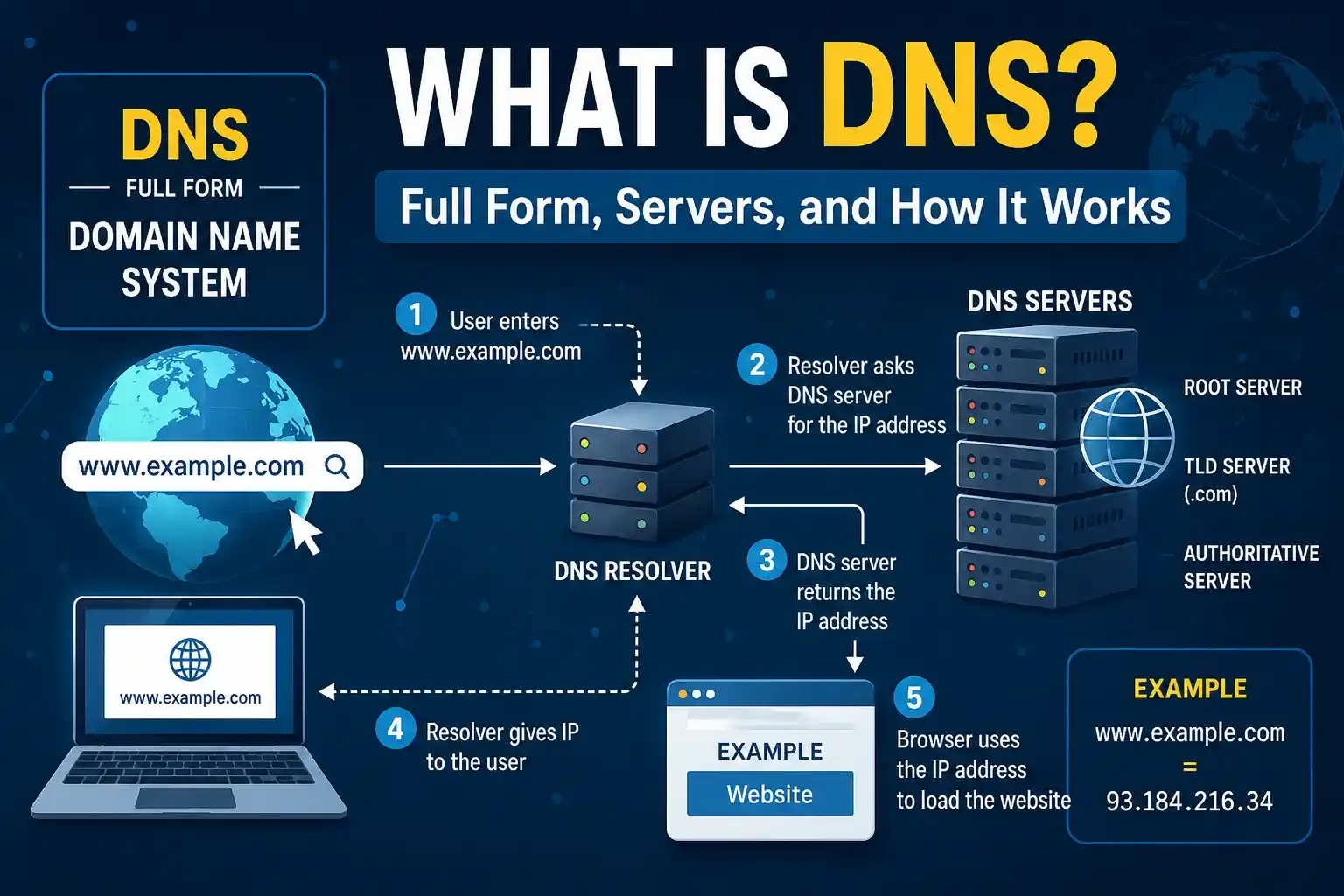
Have you ever wondered how your device locates a website when you type its name into your browser, such as google.com?
DNS, or the Domain Name System, is the solution.
DNS functions similarly to a phone book on the internet. It transforms memorable domain names into computer-understandable IP addresses. It would be harder to visit websites without DNS, as we would have to memorize numbers rather than just the names of the websites.
In straightforward language, we will describe DNS, its full form, how DNS servers operate, the many kinds of DNS servers, and the significance of DNS in this guide.
What Is DNS?
DNS stands for Domain Name System.
It is a system that translates domain names into IP addresses. When you enter a website address into your browser, DNS helps your device find the correct server where that website is hosted.
For example:
- Domain name: example.com
- IP address: 93.184.216.34
People find domain names easier to remember, while computers use IP addresses to communicate with servers.
So, you can think of DNS as a translator between humans and computers.
Simple Example of DNS
Imagine you want to call a friend.
You probably search for their name in your phone instead of remembering their phone number. Your contacts app finds the number for you.
DNS works in a similar way:
Website Name → DNS → IP Address → Website Server
This happens very quickly, usually within a fraction of a second.
What Is the Full Form of DNS?
The full form of DNS is Domain Name System.
DNS is a distributed naming system used across the internet to connect domain names with IP addresses.
For example:
www.example.com → IP address
When you enter the domain name in your browser, DNS helps locate the server associated with that domain.
Why Is DNS Important?
DNS is one of the basic systems that makes the internet easy to use.
Without DNS, users would need to enter an IP address every time they wanted to visit a website.
For example, instead of typing:
you might have to remember something like:
93.184.216.34
That would obviously be difficult when you visit hundreds of websites.
DNS provides several important benefits:
- Makes websites easier to access
- Converts domain names into IP addresses
- Helps browsers locate web servers
- Supports email delivery
- Improves internet usability
- Allows websites to change servers without changing their domain names
How Does DNS Work?
DNS may sound complicated, but the basic process is fairly simple.
Suppose you type www.example.com into your browser.
The following steps generally happen:
1. You Enter a Domain Name
You type a website address into your browser.
For example:
www.example.com
Your browser needs to know which IP address belongs to that domain.
2. Browser Checks Its DNS Cache
Your browser may check to see if it already knows the IP address before reaching out to a DNS server.
The browser can use the data directly if it is stored in the cache and hasn’t expired.
Time is saved and fewer pointless DNS enquiries are made as a result.
3. The operating system verifies DNS data
Your operating system may examine its own DNS cache if the browser is unable to provide the solution.
The operation can be completed fast if the IP address is already saved there.
4. The request is received by the DNS resolver
The request is forwarded to a DNS resolver if the IP address is not available locally.
Although you can utilise a public DNS service, your internet service provider often provides the resolver.
Finding the right IP address is the resolver’s responsibility.
5. A Root DNS Server is contacted by the resolver
The resolver contacts a root DNS server to begin the DNS lookup process if it does not already have the answer.
The final IP address is typically not provided by the root server.
Rather, it points the resolver in the direction of the relevant Top-Level Domain (TLD) server.
The resolver for a.com domain, for instance, is pointed in the direction of the.com TLD servers.
6. TLD Server Is Contacted
The TLD server knows information about domains using that extension.
For example:
- .com
- .org
- .net
- .in
The TLD server points the resolver toward the domain’s authoritative DNS server.
7. Authoritative DNS Server Provides the Answer
The authoritative DNS server contains the DNS records for the domain.
It can provide the IP address associated with the requested hostname.
The resolver then sends the result back to your device.
8. Your Browser Connects to the Website
Finally, your browser uses the IP address to connect to the website’s server and request the webpage.
The entire process usually happens very quickly.
DNS Lookup in Simple Terms
The complete process can be summarized like this:
You type a domain → Browser checks cache → DNS resolver → Root server → TLD server → Authoritative DNS server → IP address → Website loads
This process is called a DNS lookup or DNS resolution.
What Is a DNS Server?
A DNS server is a server that stores or provides information about domain names and their associated DNS records.
Different DNS servers perform different jobs during the DNS resolution process.
The main types include:
- DNS Resolver
- Root DNS Server
- TLD DNS Server
- Authoritative DNS Server
Let’s understand each one.
1. DNS Resolver
A DNS resolver, also called a recursive resolver, receives DNS requests from users’ devices.
It searches for the required DNS information and returns the result.
Your internet service provider may provide a resolver automatically, but you can also configure your device or router to use another DNS resolver.
2. Root DNS Server
Root DNS servers are at the top of the DNS hierarchy.
They don’t normally provide the final IP address for a website.
Instead, they tell the DNS resolver where to find the appropriate TLD server.
There are 13 logical root server identities, operated through a globally distributed network of many physical instances.
3. TLD DNS Server
TLD stands for Top-Level Domain.
TLD servers handle domain extensions such as:
- .com
- .org
- .net
- .edu
- .in
- .uk
For example, if you’re looking for a .com domain, the resolver communicates with the .com TLD infrastructure.
4. Authoritative DNS Server
An authoritative DNS server contains the official DNS information for a domain.
It provides DNS records for the domain, such as its IP address and other services.
For example, an authoritative server may tell the resolver that:
example.com → 93.184.216.34
The resolver can then return that information to your device.
What Are DNS Records?
DNS records are instructions stored in the DNS system.
They tell DNS servers how a domain should be handled.
Some common DNS records include:
A Record
An A record connects a domain name to an IPv4 address.
Example:
example.com → 192.0.2.1
AAAA Record
An AAAA record connects a domain to an IPv6 address.
CNAME Record
A CNAME record points one domain or hostname to another hostname.
It is commonly used for aliases.
MX Record
An MX record specifies which mail servers should receive email for a domain.
This is important for business and personal email services.
TXT Record
A TXT record stores text information associated with a domain.
TXT records are commonly used for verification and email security technologies such as SPF, DKIM, and DMARC.
NS Record
An NS record identifies the authoritative name servers for a domain.
What Is DNS Caching?
DNS caching means temporarily storing DNS information so it can be reused later.
Caching can happen at different levels, including:
- Web browser
- Operating system
- Router
- DNS resolver
For example, if your device recently looked up a website, it may already have the domain’s IP address stored.
Instead of performing the entire DNS lookup again, it can use the cached information.
Why Is DNS Caching Useful?
DNS caching can:
- Reduce lookup time
- Make websites load faster
- Reduce DNS traffic
- Improve network efficiency
However, outdated DNS cache information can sometimes cause website access problems.
That’s one reason clearing the DNS cache can help when troubleshooting certain connection issues.
What Is DNS Propagation?
Changes to a domain’s DNS records might not take effect right away.
DNS propagation is the term used to describe this.
The TTL (Time to Live) of the record determines how long DNS information can be cached, which is the primary reason of the delay.
Users may momentarily receive either new or old DNS information, depending on the update and caching behaviour.
DNS TTL: What Is It?
Time to Live is referred to as TTL.
It instructs DNS resolvers on how long to cache a DNS record before looking for updated data.
For instance, a resolver can typically cache a DNS record with a TTL of 3600 seconds for up to an hour before it needs to be refreshed.
While a higher TTL might minimise repeated DNS enquiries, a shorter TTL can enable changes to be detected sooner.
A DNS query: What Is It?
A DNS query is a request for DNS data.
When you type a webpage into your browser, for instance, your device might submit a DNS query requesting:
“Which IP address is associated with this domain?
After processing the request, the DNS system provides the relevant data.
What Is the Difference Between DNS and IP Address?
DNS and IP addresses are related, but they are not the same thing.
| DNS | IP Address |
| Domain Name System | Internet Protocol address |
| Helps translate domain names | Identifies a network destination |
| Uses domain names and DNS records | Uses numerical addresses |
| Example: example.com | Example: 93.184.216.34 |
In simple terms:
DNS finds the address, while the IP address identifies the destination.
What Is Public DNS?
A public DNS service is a DNS resolver that people can use instead of the DNS resolver provided by their internet service provider.
Popular public DNS services include:
- Google Public DNS
- Cloudflare DNS
- Quad9
People may choose a public DNS service for reasons such as performance, reliability, filtering, or privacy features.
However, changing DNS does not automatically make your entire internet connection private or secure.
Is DNS Secure?
Traditional DNS was not originally designed with encryption.
Standard DNS queries can potentially be observed or manipulated by someone with the ability to monitor or interfere with network traffic.
Modern technologies such as DNS over HTTPS (DoH) and DNS over TLS (DoT) can encrypt DNS queries between a device and its DNS resolver.
This can improve privacy and protect DNS traffic from certain types of network monitoring.
Common DNS Problems
Sometimes DNS problems can prevent websites from loading correctly.
You may see errors such as:
- DNS_PROBE_FINISHED_NXDOMAIN
- DNS_PROBE_FINISHED_BAD_CONFIG
- The server DNS address could not be found
- DNS server not responding
- Website not loading
Possible causes include the following:
- Incorrect DNS settings
- Temporary DNS server problems
- Outdated DNS cache
- Router issues
- Internet connection problems
- Incorrect DNS records
- Domain configuration errors
Restarting your router, checking DNS settings, or flushing the DNS cache can sometimes help troubleshoot these issues.
How to Flush a DNS Cache?
If you’re experiencing DNS-related problems, you may want to clear your device’s DNS cache.
Windows
Open Command Prompt and run:
ipconfig /flushdns
You should receive a message confirming that the DNS resolver cache was successfully flushed.
macOS
The exact command can vary depending on the macOS version. DNS cache management generally involves using Terminal commands appropriate for your version.
Chrome
Chrome also maintains its own DNS-related cache.
In supported Chrome versions, you can access internal DNS information through:
chrome://net-internals/#dns
From there, you may see an option to clear the host cache.
Why DNS Matters for Website Owners and SEO?
DNS is also important for website owners.
If DNS records are incorrectly configured, visitors may be unable to access your website.
DNS configuration can affect:
- Website availability
- Email delivery
- Domain verification
- CDN configuration
- SSL-related setups
- Website migrations
However, DNS itself is not a direct Google ranking factor in the same way as content relevance or page quality.
A reliable DNS setup is still important because users and search engine crawlers need to be able to reach your website.
DNS vs. DHCP: What’s the Difference?
DNS and DHCP are sometimes confused because both are related to networking.
DNS helps translate domain names into IP addresses.
DHCP (Dynamic Host Configuration Protocol) automatically provides devices with network configuration information, such as an IP address, gateway, and often DNS server details.
In simple terms:
DNS = Finds destinations
DHCP = Helps configure devices on a network
Final Thoughts
DNS is one of the most important systems working behind the scenes on the internet. It allows us to use simple domain names instead of memorizing complicated IP addresses.
From the moment you type a website address into your browser, DNS can work through multiple layers—including DNS resolvers, root servers, TLD servers, and authoritative servers—to find the correct destination.
Understanding DNS is useful whether you’re a regular internet user, website owner, blogger, developer, or SEO professional. Once you understand the basic DNS process, many common website and internet connection problems become much easier to troubleshoot.
Frequently Asked Questions About DNS
DNS stands for Domain Name System. It translates human-friendly domain names into IP addresses that computers use to communicate.
DNS is like an internet phonebook. It helps your browser find the correct IP address when you enter a website name.
A DNS server stores or provides DNS information and helps resolve domain names into IP addresses.
We need DNS because remembering domain names is much easier than remembering numerical IP addresses for every website.
DNS generally works by sending a domain lookup through a resolver, which may query root, TLD, and authoritative DNS servers before returning the required DNS information.
DNS caching is the temporary storage of DNS information. It helps reduce lookup time and unnecessary DNS requests.
If DNS is unavailable or misconfigured, your device may have trouble finding websites even when your internet connection itself is working.
Changing DNS can sometimes improve the speed of DNS lookups or reliability, but it does not automatically increase your overall internet bandwidth.
There is no single DNS service that is best for everyone. Performance depends on your location, network, resolver availability, and other factors.
DNS is not normally considered a direct ranking factor, but reliable DNS is important because search engines and users need to access your website successfully.